Wukong Enterprise Membership FAQ
Welcome to learn about Wukong Enterprise Member - the AI office intelligence launched by DingTalk, which supports unified procurement, seat allocation and quota management. You can make an appointment with a service expert for free and learn more about Wukong Enterprise membership »Click here to make an appointment

1. Product functions
What is Wukong membership?
Answer: Wukong is an AI work platform launched by DingTalk. It helps you efficiently complete various work tasks such as schedules, documents, approvals, and meetings through conversational interaction. Mobilize multiple applications in one sentence, making AI truly your work partner. By upgrading to Wukong membership, you can obtain more benefits such as grains and flagship models, and support individual purchases or organizational bulk purchases.
What is the difference between Wukong personal membership and Wukong corporate membership?
Answer: There are major differences between Wukong individual members and corporate members in terms of purchasing entities and resource permissions:
- The purchasing entities are different: corporate members are purchased by the company and allocated to employees for use, while individual members are paid by individuals.
- Resource permission management: After the enterprise unified procurement, the administrator assigns it to employees for use, and can also uniformly control permissions and quotas. Direct purchase by individuals and use through “My AI Team” (virtual organization), suitable for individual users (such as OPT organization).
What is the difference between ordinary membership and premium membership?
Answer: The core difference between the two lies in the grain calculation amount and available models. The table below can help you make a quick comparison:
| Benefits Comparison | Free | Ordinary Member | Premium Member |
|---|---|---|---|
| Price | Free | ¥39/month/person | ¥99/month/person |
| Counting grain resources | × | 1,000 counting grains/month | 3,000 counting grains/month |
| Available Models | Standard, Premium Models | Standard, Premium, Flagship Models | Standard, Premium, Flagship Models |
| Custom model access | × | × | ✓ needs to apply to the main administrator for activation |
2. Buying Guide
Purchasing and Distribution
After the main administrator purchases a membership, will the account be
automatically assigned to the member?
Answer: It will not be automatically assigned after purchase and needs to be assigned manually by the main administrator. The main administrator logs in to DEAP backend, views member resources on the enterprise resource management page, and can allocate them to himself or other members in the enterprise. After the allocation is completed, members can use them.

Where can I check my grain consumption?
Answer: After entering Wukong, click the avatar in the lower left corner → [Settings] → [Usage] to view the grain consumption details of [Usage in the enterprise] and [Personal usage] respectively.

After the Wukong Enterprise membership payment is successful, where can I check the benefits?
Answer: Log in DEAP Backstage - Enterprise Resource Management page to view the number of Wukong members, Wukong AI grain counting quota, allocated members, etc.

Permission control
How to let designated employees obtain membership or count?
Answer: The main administrator can configure membership seats or particle quotas in the DEAP backend, accurately allocate corporate membership resources, support account recycling, and flexibly schedule at any time.

Can I set a separate calculation quota for each employee?
Answer: Yes. Supports allocating usage quotas to employees on demand, making resources more controllable.

We are a group company. Can we manage granules and members uniformly across branches?
Answer: Currently, unified management across organizations is not supported. Wukong corporate members are purchased and allocated by organization, and each branch company needs to purchase and configure independently.
Can membership grains be allocated across accounts?
Answer: The membership bonus calculation particles do not support splitting or transfer. Enterprise general calculation particles support flexible configuration. You can manage resources by setting employee quotas.
3. Particle Counting Rules
3.1 Consumption rules
When corporate employees use Wukong, in what order are the grains deducted?
Answer: Wukong’s computing grain consumption gives priority to using enterprise computing grains (Wukong enterprise member computing grains -> enterprise computing grains resources). When the enterprise computing grains are exhausted, it will automatically switch to personal computing grains (free counting grains -> paid counting grains), and the computing grains with the shortest validity period will be consumed first.
Can Wukong use the enterprise universal particle counting package?
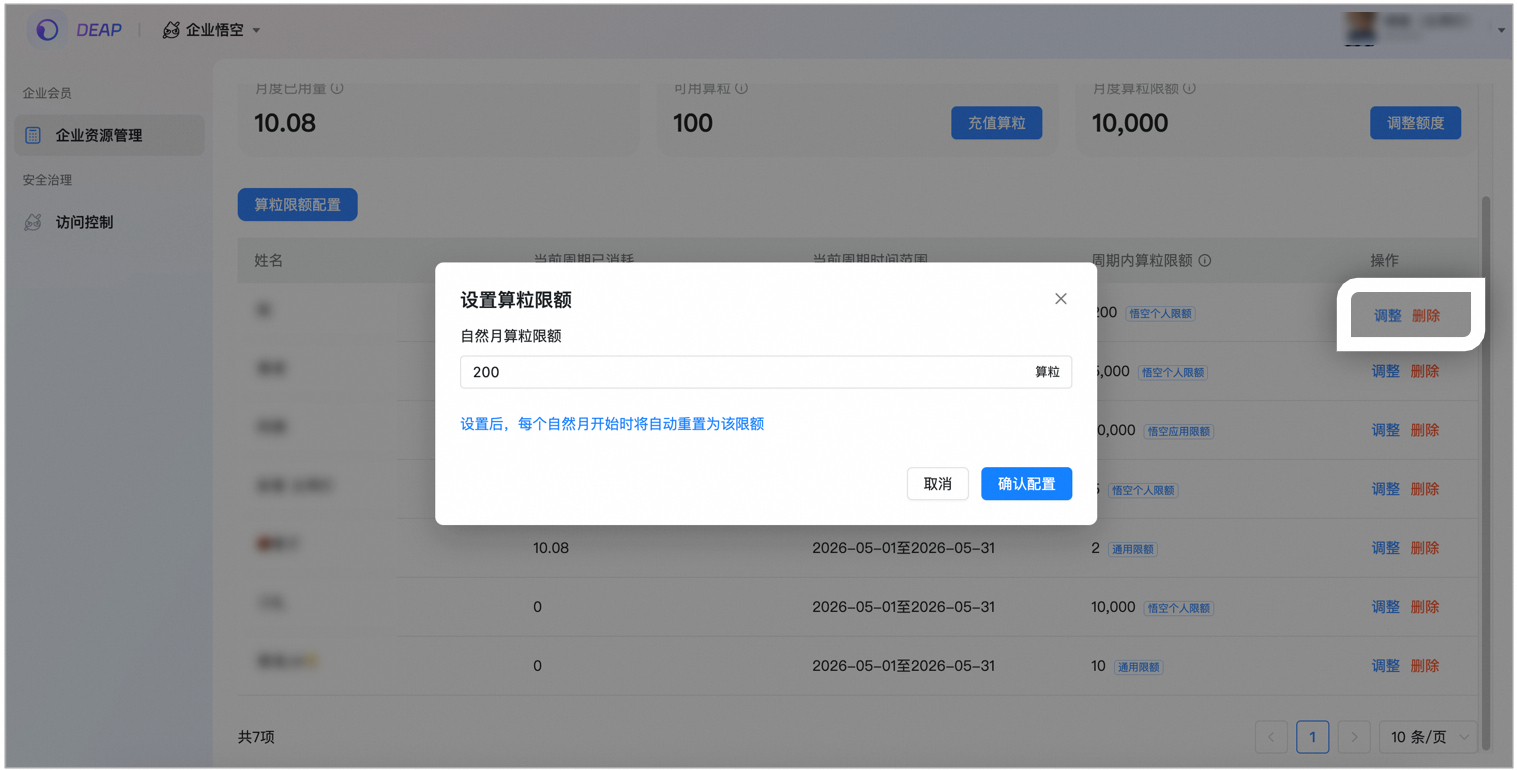
Answer: Yes. When Wukong Enterprise members use up the counting grains, they will start to consume the general grain counting package. The general enterprise granularity package can set the usage limit by member to support flexible configuration. You can manage resources by setting the quota limit for each employee.
Can the unused grains this month be carried forward to the next month?
Answer: Carryover is currently not supported. The gift grains will be valid for 15 days starting from the date of gifting; when purchasing ordinary members/premium members, the unused grains will not be carried forward and will be cleared on the membership expiration date; additionally purchased recharge pack grains will not be cleared at the end of the month and are valid for up to 1 year.
Can membership grains be allocated across accounts?
Answer: The membership bonus calculation particles do not support splitting or transfer. Enterprise general calculation particles support flexible configuration. You can manage resources by setting employee quotas.
For example: after a company purchases an ordinary corporate membership, it obtains 1,000 grains. It cannot be divided into several parts and distributed to employees for use. It can only be allocated to company member A. After A uses 200 grains, the remaining 800 grains can be allocated to B through seat recycling.
3.2 Consumption viewing and budget management
Where can I see detailed consumption records of grain counting?
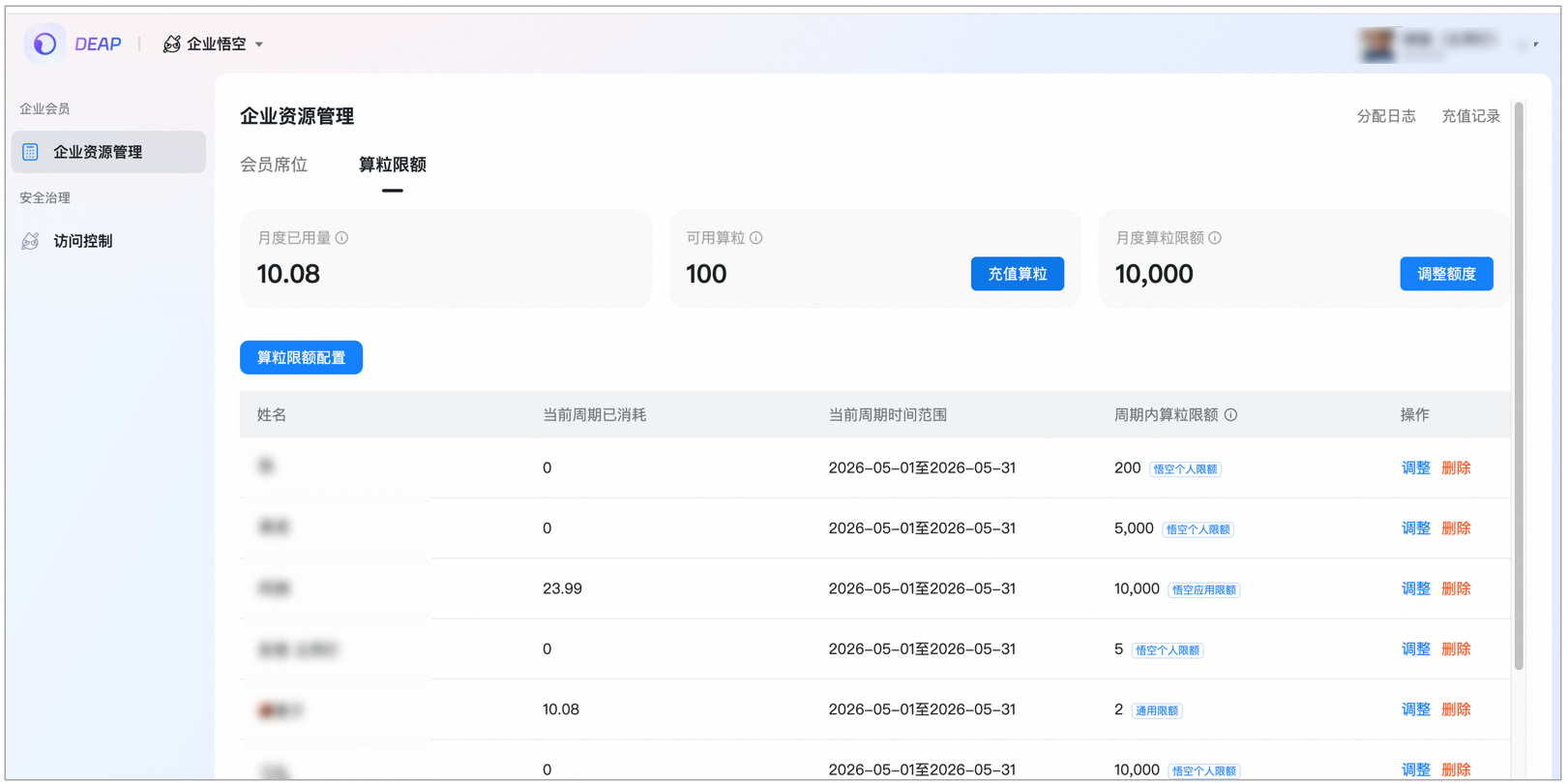
Answer: Log in DEAP Backstage - Enterprise Resource Management page to view the overall usage of Wukong AI particles, including:
Member seat management: View allocated seats and recycle or reallocate them at any time
Particle limit management: Set the overall upper limit of Wukong application and the upper limit of individual employees
Member seats: assign/recycle accounts


- List displays all activated seats (including recycled ones), supporting recycling, upgrading and downgrading operations
- The same person can only obtain one membership status and cannot be assigned repeatedly.
- After recycling, seats are still recorded and can be used for reassignment
Granular calculation limit: Set application/member granular calculation limit
*Set the overall upper limit for Wukong application *Set the upper limit for a single employee

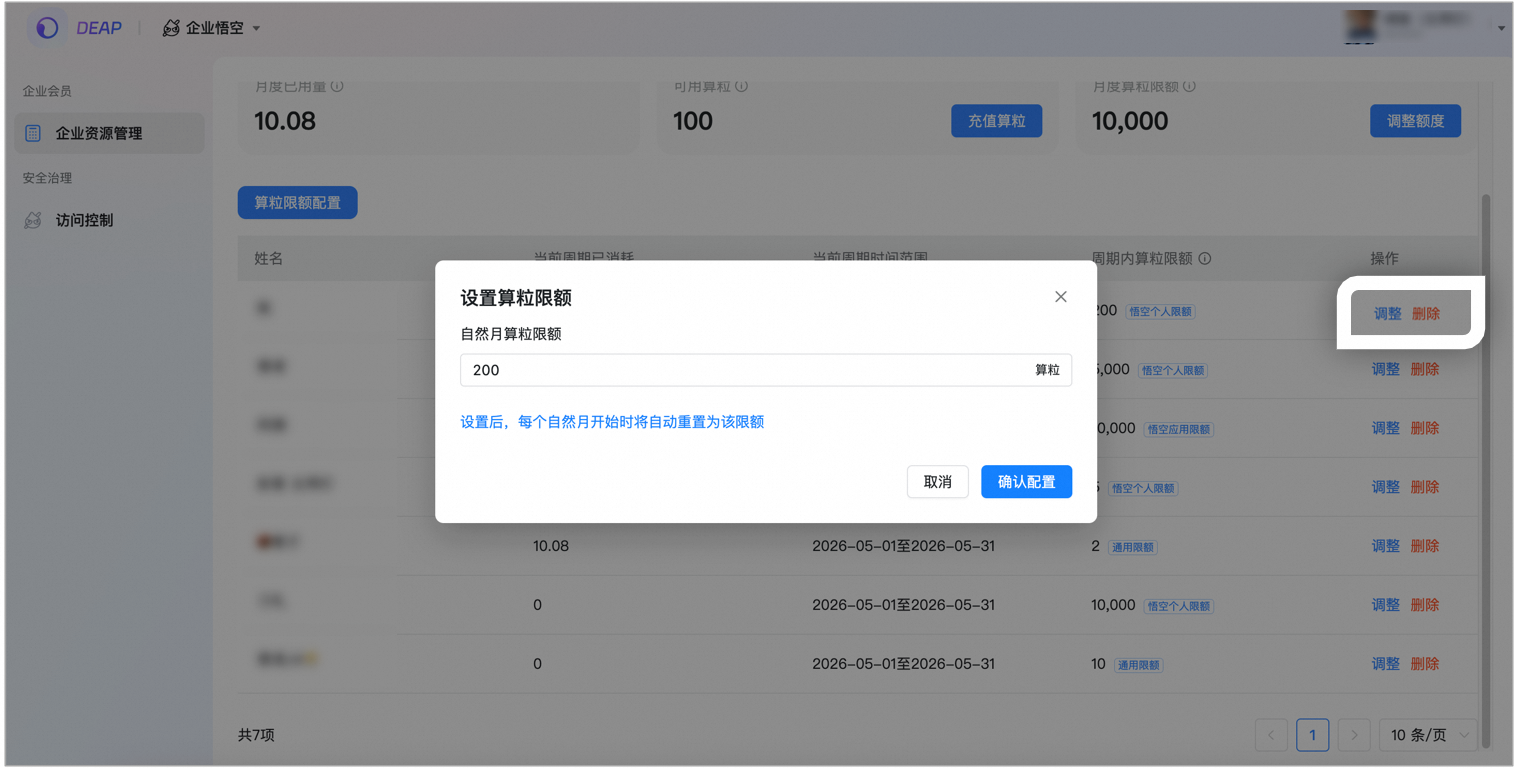
- Set effects
How to predict the grain consumption in advance and make a budget?
Answer: It is recommended to observe the actual consumption of counting grains during personal use of Wukong, and use this as a basis for calculation. For example, record the average daily consumption in the previous 1-2 weeks, and estimate the total monthly consumption based on this to select the appropriate membership level and granular package.
Worried about uncontrollable grain consumption, what should I do?
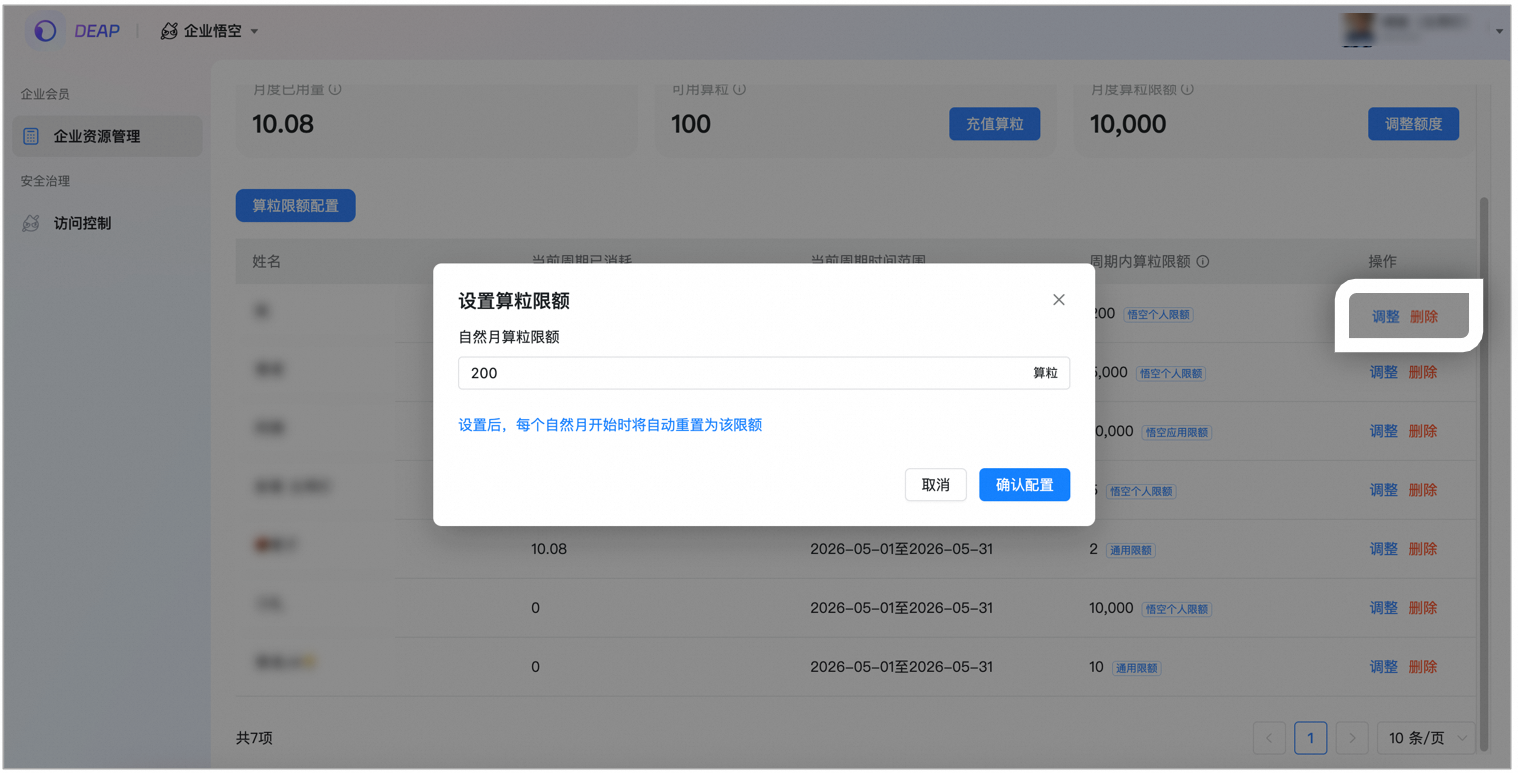
Answer: You can set a separate upper limit for granular usage for each employee to effectively prevent individual users from consuming large amounts. Administrators can adjust each member’s limit at any time in the DEAP backend, making the budget fully controllable.
4. Frequently Asked Questions
Question: After purchasing Wukong Enterprise membership, where can I issue an invoice?
Answer: Hello, after purchasing Wukong Enterprise membership, the administrator can apply for invoices in the management background as follows:
Management Backstage oa.dingtalk.com > Value-added Services > My Orders > Apply for Invoicing

Question:
After purchasing Wukong corporate membership, do I still need an invitation code to use Wukong?
Answer: No, Wukong corporate members can directly use Wukong without an invitation code. It should be noted that after purchasing Wukong corporate membership, the main administrator needs to assign seats in the DEAP backend - Enterprise Resource Management. Members assigned to the account can use Wukong without an invitation code.
Question: Does Wukong Enterprise membership support custom model configuration?
Answer: Wukong individual senior members support custom configuration models, and Wukong corporate senior members already support custom model configurations. Just download the latest version of Wukong.
Question: Is there enterprise skills management? What capabilities are supported?
Answer: Supported and under development. It supports administrators to centrally accumulate and manage enterprise skill assets after employees upload their skills. Administrators can set the visibility of employee skills or pre-install skills for employees. If you want to experience it in advance, you can click here to apply.
Question: After recharging the package, where can I check the payment status?
Answer: Granular recharge can be processed around the clock (including holidays). Under normal circumstances, the recharge can be credited in real time; in case of system processing peak or holidays, there may be a short delay. It is usually completed within half a working day, so please be patient.
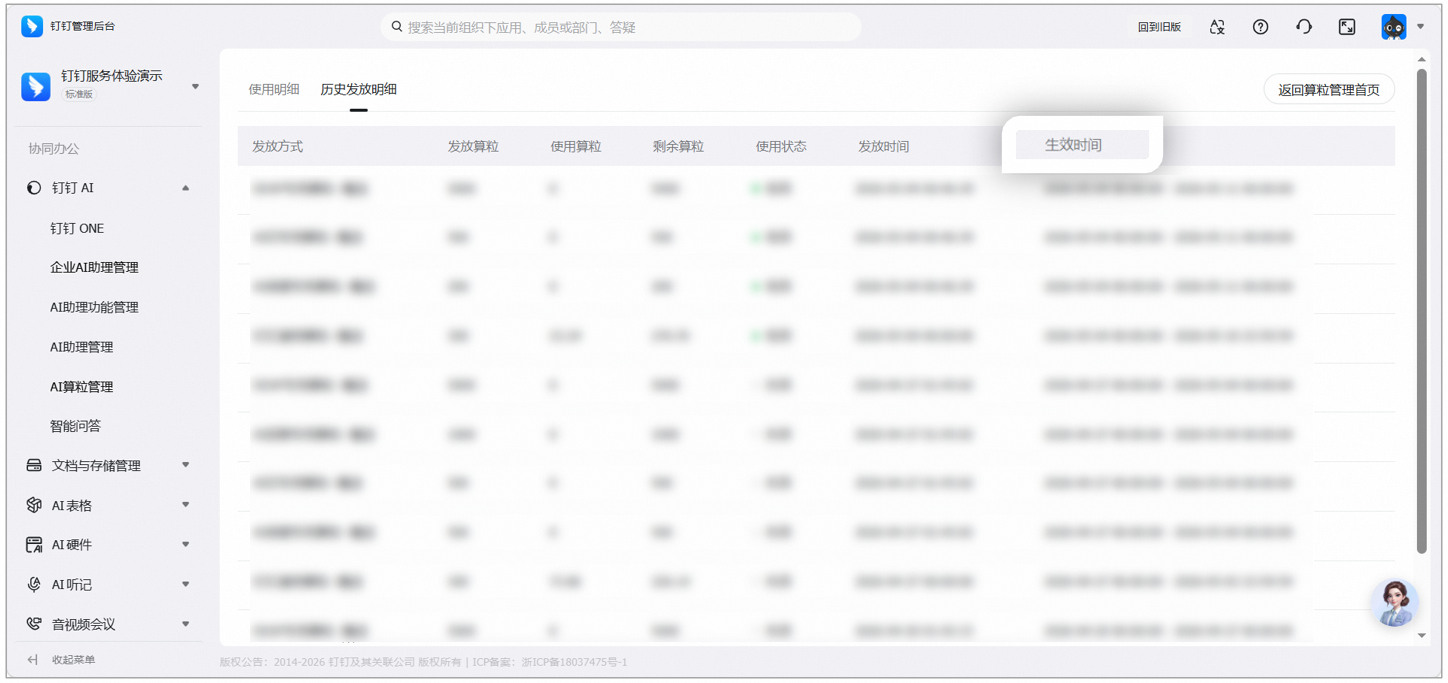
The main administrator logs in to DEAP backend > Enterprise Resource Management > Granule Quota > Available Granules View the number of granules; For all DingTalk Ai granules purchased, authorized administrators can also log in to Administration Backstage > DingTalk AI > AI Granule Management > Historical Distribution Details to view the granule distribution details; The calculated grain effective time can be viewed in Historical Distribution Details.


Question:
What is the difference between the grain counting of Wukong AI in the DEAP backend and the grain counting in the DingTalk management backend?
Answer: The computing grains purchased from the two places are all general-purpose computing grains for enterprise AI. However, the statistical calibers of the computing grains in the two places are different: the “total available computing grains” in the DEAP backend only include general computing grains; the “available computing grains” in the management backend include both special-purpose and general computing grains.
The instructions are as follows:
- DEAP Backstage Available computing grains [Only includes general computing grains]: The total number of computing grains available for enterprises, including DingTalk official gifts and organizational recharge parts (updated in real time);
- Management backend Available counting grains [general counting grains + special counting grains]: The currently effective number of counting grains, including counting grains donated by DingTalk official and recharged by organizations. DingTalk official will give away a certain number of counting grains every week, which will be reset at 24:00 on Sunday. The counting grains recharged by organizations are valid for one year.
View the path as follows:
DEAP Backstage > Enterprise Resource Management > Granule Quota > Available Granules;
Management backend oa.dingtalk.com > DingTalk AI > AI granule management > Available granules.

