Wukong Enterprise Membership Grain Consumption
Welcome to learn about Wukong Enterprise Member - the AI office intelligence launched by DingTalk, which supports unified procurement, seat allocation and quota management. You can make an appointment with a service expert for free and learn more about Wukong Enterprise membership »Click here to make an appointment

Function introduction
Help Wukong corporate members quickly master core operations such as grain balance checking, consumption record query, recharge management and personal quota setting.
Wukong Enterprise Membership Overview
- Log in to DEAP Backstage and view the Enterprise Resource Management page. You can directly view the certification status and basic usage data:
Number of Wukong members: The number of completed member seat bindings;
Number of company employees: refers to the number of people in the address book; 2. Progress bar number:

Numerator: the number of seats that have completed seat binding;
Denominator: total number of valid seats;
- Seat Expiration Date: refers to the expiration date of a valid order;
As shown in the picture: There are a total of 50 seats for ordinary members, and the binding of 5 seats has been completed. There are a total of 47 seats for senior members, and the binding of 30 seats has been completed;

Check grain consumption
- Monthly used amount: In a natural month, the total number of enterprise grains used by Wukong (T+1 data, new consumption on that day will be updated the next day);
- Available computing grains: The total number of computing grains available to the enterprise, including DingTalk official website gifts and organizational recharge parts (updated in real time);
- Monthly grain counting limit: In a natural month, the upper limit of grain counting available for Wukong application is set by the enterprise (updated in real time);
- Set limit: After setting, the limit will be automatically reset at the beginning of each calendar month;
- Recharge grain counting: Quick grain counting recharge entrance, you can purchase appropriate AI grain counting packages;
- Wukong grain calculation overview:

- Current cycle single member grain consumption details:

- The pellet consumption details of enterprise employees can only be viewed on the enterprise usage page after employees log in to their account:

View recharge records
- Log in to DEAP backend and find the [Recharge Record] entrance:

- Recharge records: Member recharge records will be displayed;

Set grain counting limit
The system supports setting the grain usage quota. The final effective quota will be the minimum value of each quota item within this week. The particle counting limit includes three dimensions: Wukong application limit, Wukong personal limit and general limit.
- Wukong application quota: Supports unified adjustment of the limit through the “Wukong AI particle counting” module to meet batch configuration requirements.
- Operation: Click “Adjust Quota”, enter the natural monthly granular upper limit value, confirm and save, and then you can update the limit configuration in batches.

- Wukong’s personal limit: Click to adjust, and the system supports fine-tuning for a single person to meet individual needs.

- General quota: Click to adjust to support setting general quotas for some employees to meet the differentiated configuration needs of specific user groups.

Personnel control rule configuration: Click here to view details »Administrator controls according to the personnel dimension

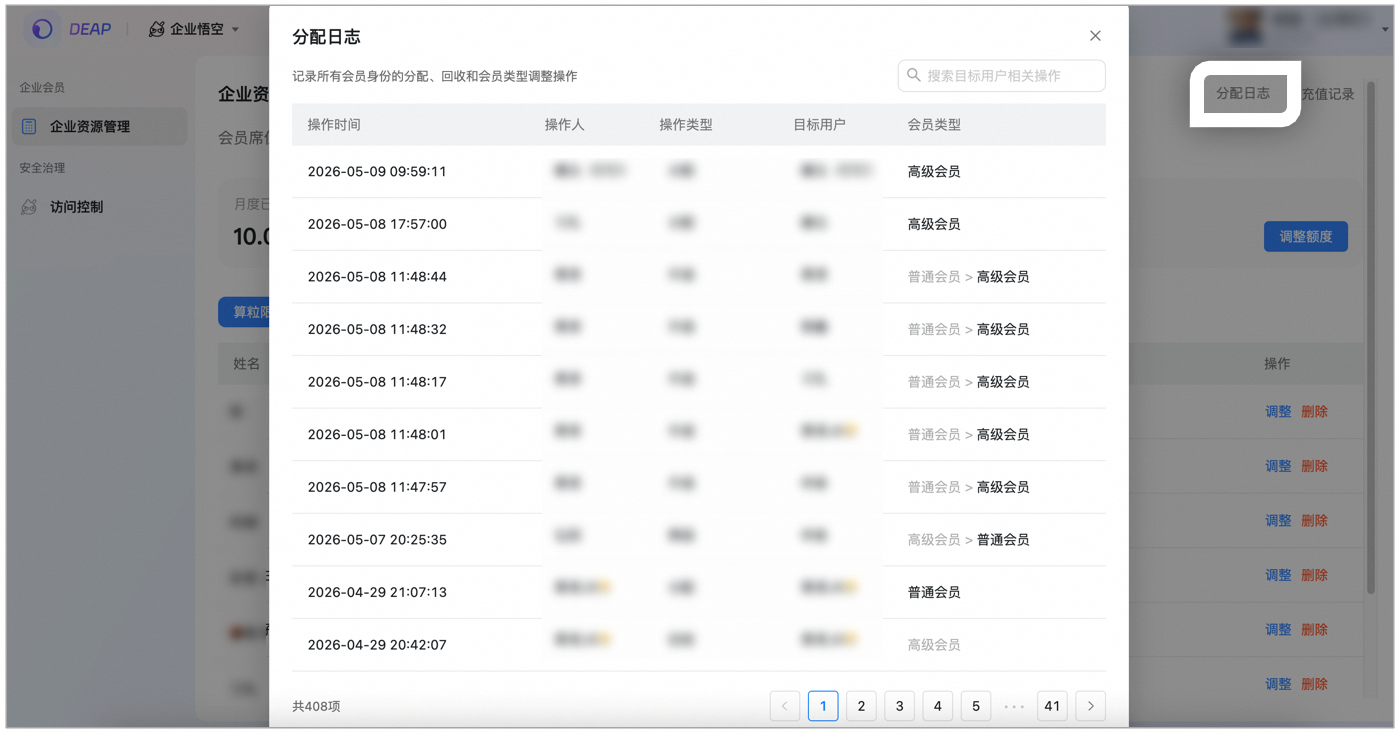
Allocation log
In order to improve the traceability of membership management, the Assignment Log function is added to completely record all membership status change operations within the enterprise:
Recording range:
- Allocation and Recycling: The allocation and recycling operations of member seats are fully retained.
- Upgrade and downgrade: The adjustment of membership type (ordinary member → premium member, or reverse downgrade) is recorded.
View path: Enter DEAP Backstage > Enterprise Resource Management > Click Allocation Log in the upper right corner of the page
Each log will display the operation time, operator, operation type and target user information, allowing administrators to check historical change records at any time.


Assign members in batches
In order to improve the efficiency of seat allocation, the **Batch Allocation** membership capability has been added, allowing administrators to allocate membership seats to multiple members at one time without the need to operate one by one.

Operation steps

**1.** The main administrator enters [DEAP Backstage](https://deap.dingtalk.com/#/deap-home) **> Enterprise Resource Management > Member Seats >** Click **Go to Assign**;

**2.** Supports searching for company members in the search box and checking the target members (allocated members will be marked with status and cannot be selected repeatedly);

**3.** After confirmation, the system will perform allocation in batches, which is expected to be completed within **2 minutes**. After completion, detailed records can be viewed in the **Allocation Log**;

*Note:
    * **Override Rules**: If a member already holds a membership seat, reassignment will overwrite his current status with the latest operation (such as upgrading from an ordinary member to a premium member).
    * **Message notification**: After the assignment is completed, the system will automatically notify the assigned members through the DingTalk secretary function number.
Operation diagram:
- Enter the management background → “Enterprise Resource Management” → “Member Seats” → click “Go to Assign”

- Check the target members (allocated members will be marked with status and cannot be selected repeatedly):

- After confirmation, the system will perform allocation in batches and is expected to be completed within 2 minutes. After completion, detailed records can be viewed in the “Allocation Log”;
- If a member already holds a membership seat, the reassignment will overwrite its current status with the latest operation (such as upgrading from an ordinary member to a senior member). After the assignment is completed, the system will automatically notify the assigned member through the DingTalk secretary function number.

FAQ
Q1:
When I connect a custom model to Wukong’s new mission, will I bear additional token or grain counting fees?
A: Premium members can access custom models without additional token or grain calculation fees. This feature is only open to premium members. If ordinary members want to access custom models, please upgrade to senior members.
