Wukong FAQ
Question: What is Wukong?
Answer: Wukong is an AI-driven intelligent work platform that allows AI to operate your computer like a real assistant, helping you complete various tasks from simple to complex. Wukong is not a chatbot, but an AI desktop agent that can do hands-on work. For details, please view»Introduction to Wukong.
Question: Where is the entrance to Wukong?
① Local computer (recommended: full-featured experience)
Applicable scenarios: Daily office work, need for in-depth control of local files and applications, and long-term stable use.
How to obtain: Official website download now
- System requirements:
- Windows (Win10 64-bit 1909 and above) Beta
- macOS: MacOS14 and above (M series chips/Intel chips) Beta
- Core values:
- ✅ Local control: directly operate local commonly used software (such as Excel, browser, IDE, etc.).
- ✅ Privacy and security: Data is mainly processed locally, without uploading to the cloud sandbox.
- ✅ Optimum performance: Utilize local computing power to achieve the fastest response speed.
② DingTalk client integration (mobile/desktop management)
Applicable scenarios: Initiate tasks at any time, view progress in real time, and work on the go.
- Core values:
- ✅Anytime, Anywhere: Supports mobile phones, Pads and DingTalk desktops to break space limitations.
- ✅ Instant notification: When a task is completed, an error is reported, or confirmation is needed, you can be reached in real time through DingTalk messages.
- Entrance location:
- IM robot: Find Wukong in the DingTalk chat list and initiate the task through dialogue commands.
- The left workbar of the client: Click the Wukong application icon on the left workbar of DingTalk to enter the visual management panel.
Question: How to get Wukong’s invitation code?
Answer: You can get it from Wukong official website, View details.
Question: Does the Wukong invitation code have an expiration date?
Answer: The invitation code has a validity period. If you obtain the invitation code, please enter the Wukong product in time to complete the redemption.
For example: the invitation code “Wukong is so cute” was released at 9 o’clock. There are 1,000 invitation codes in total. When 1,000 users have redeemed them, the invitation code will become invalid immediately.
Question: How to use Wukong invitation code?
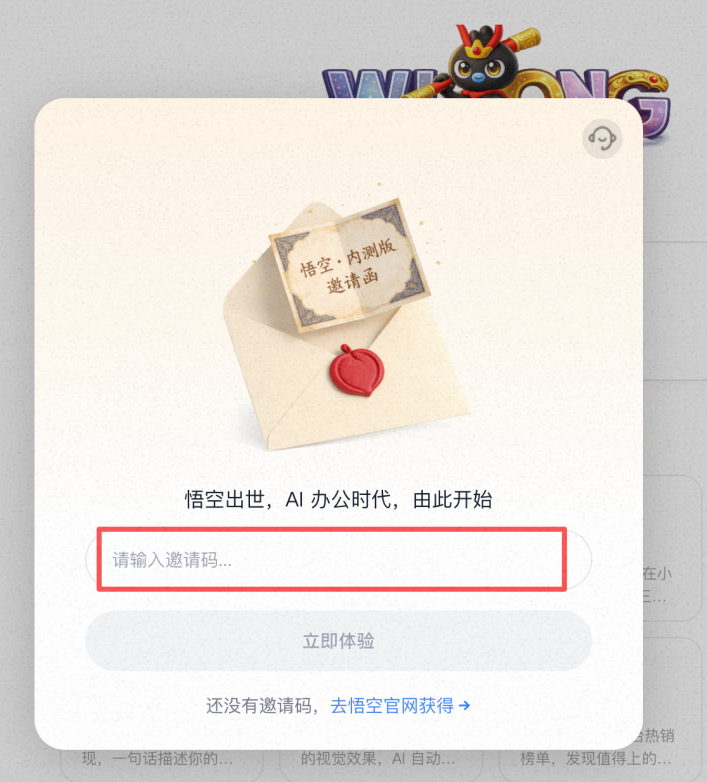
Answer: When you open Wukong desktop, there will be a pop-up window for filling in the invitation code. Just enter the invitation code you obtained into the box below.
Question: How does Wukong charge?
Answer: Hello, all Wukong users (including those who have not paid) will receive free Wukong grains every month starting from the user’s first login day. 100 grains will be distributed every day for 7 days, with a maximum of 700 grains issued per month. The grains issued will be valid for 15 days from that day. You can experience it without paying. After the grains are consumed, you need to purchase a Wukong membership to continue using it. Ordinary membership is 39 yuan/month, and premium membership is 99 yuan/month. *If you don’t have enough grains, you can purchase them as needed. Domestic additional grain counting recharge package (※ The recharge package counting grain is valid for 1 year, priority is given to consumption of free counting grains→membership includes counting grains→recharge package counting grains)

| Package | Quantity of grains | Price |
|---|---|---|
| Small bag | 200 | ¥9.8 |
| Big bag | 2,000 | ¥98 |
Question: When will the Wukong grayscale test end? When will it be fully launched?
Answer: Hello, Wukong is currently in a phased grayscale testing period. The specific time for full launch will be dynamically adjusted based on grayscale conditions, user feedback and performance to ensure that we provide you with the best experience. Please pay attention to product changes and thank you for your support of Wukong.
Question: Are the functions of Wukong independent app and Wukong on Dingding the same?
Answer: Hello, it’s basically the same. Wukong on DingTalk is similar to a central control platform that uniformly schedules your multiple devices to perform tasks. The independent App only controls your local computer to perform tasks.
Question: If I use it on mobile phone and computer respectively, will the data be synchronized?
Answer: Yes.
Q: Will using Wukong lead to corporate data leakage?
Answer: Hello, no, Wukong is a tool for users to improve work efficiency. According to the user’s permission configuration, Wukong can perform intelligent operations within the user’s existing permissions and within the user’s device. Without the user’s consent, DingTalk will not use Wukong-related data for other purposes, let alone AI model training.
Question: If I have any questions or suggestions about using Wukong, how can I give feedback?
Answer: Hello, log in to Wukong → Avatar in the lower left corner → Help and feedback, you can directly provide online consultation or product suggestions.

Question:
I resigned from the enterprise organization, what should I do with my data and permissions in Wukong?
Answer: Hello, as the controller of the Wukong tool, the user can reset the Wukong application before leaving the company. If administrators are worried about data permission issues, they can recover data and permissions before leaving the company according to the regulations of their company or organization.
To clear usage history and cache, you can perform a “reset” operation: enter Wukong → [Avatar] in the lower left corner → [Settings] → [About Wukong] → click [Reset App].
Warm reminder: Data cannot be recovered after reset, please operate with caution.

Question: I want to log out of my Wukong account or clear my data, what should I do?
Answer: Hello, since Wukong is authorized by DingTalk, there is no need and no way to log out of the account separately (as long as the DingTalk account is normal, Wukong can log in again at any time). If you just want to clear the local usage history and cache, you can perform a “reset” operation: enter Wukong → [Avatar] in the lower left corner → [Settings] → [About Wukong] → click [Reset App].
Warm reminder: Data cannot be recovered after reset, please operate with caution.

Question: How to add Wukong skills?
Answer: Hello! In Wukong Skill Center, you can add skills in the following three ways:
- Independent upload: If you already have a skill package, you can directly click “Upload Skills” to import it.

- Select recommendations: Browse the “Recommended Skills” list to directly select the corresponding skills.

- Quick creation: Click “+ New Skill” to invoke the skill creation assistant. Just enter the skill description you want, and the assistant will help you quickly generate and configure new skills.

Question: How can I quickly share my personal skills?
Answer: Hello, Wukong currently does not support sharing personal skills directly. You can send the SKILL.md file to the other party through DingTalk or create new skills by yourself.
Question: Are Wukong’s skill names unique?
Answer: Hello, the English name of each skill is unique.
Question: What are the system requirements for installing Wukong on the local computer version?
Answer: Hello, the minimum system version to install Wukong: Win 10+ (64-bit) or macOS 13+
**Warm Tips**: It is recommended to use a newer operating system for the best experience.
Question: Can enterprise administrators prohibit employees from using Wukong?
Answer: Wukong is a tool to help users improve their work efficiency, and its data access permissions will not exceed the user’s existing permissions. Enterprise administrators can manage employee behavior through the enterprise’s internal management system or by controlling enterprise data access permissions, equipment management and other IT technical means.
Question: How many languages does Wukong currently support?
Answer: Currently, 33 languages are supported. Please refer to the product page for details. You can log in to Wukong → Settings on the lower left → General Settings → Language to switch. Supported languages: Chinese, Traditional Chinese, English, Japanese, Korean, French, German, Spanish, Italian, Portuguese (Brazil), Portuguese (Portugal), Russian, Arabic, Hindi, Bengali, Urdu, Turkish, Vietnamese, Thai, Indonesian, Malay, Dutch, Polish, Swedish, Norwegian, Danish, Finnish, Czech, Hungarian, Romanian, Ukrainian, Hebrew, Ukrainian Greek.
Question: How to personalize Wukong?
Answer: Hello, you can log in to Wukong→Avatar in the lower left corner→Settings to make personalized settings, including general settings, Wukong nickname, tone style, model, permissions, etc.
Question: How to adjust Wukong model?
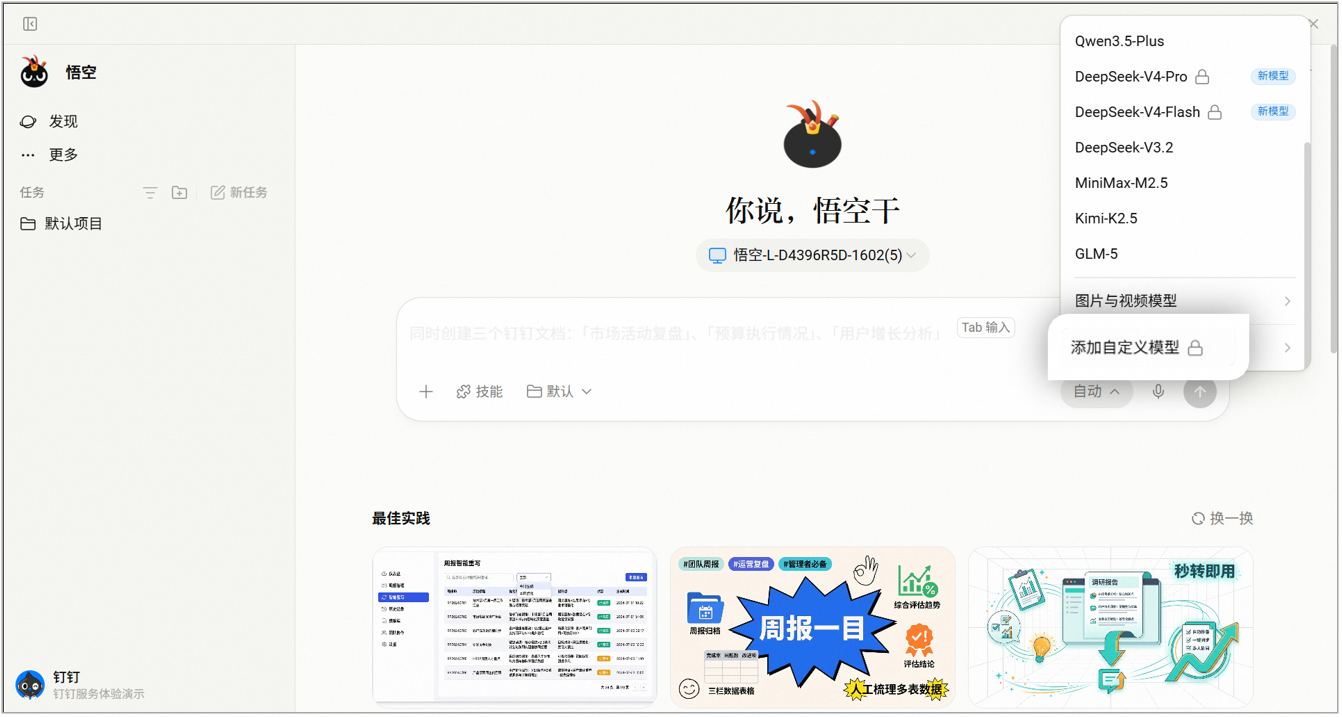
Answer: Hello, it is only for Wukong premium members. You can log in to Wukong → Avatar in the lower left corner → Settings → Model configuration and add models. When using Wukong, you can switch Wukong models and add custom models;

Question: What is the order in which grains are consumed?
Answer: The consumption order of Wukong’s personal membership counting grains: Prioritize consumption of free counting grains > Personal member counting grains > Personal recharge package counting grains;
If you have Wukong corporate membership status, the order of consumption of computing grains is: Enterprise computing grains are consumed first (Corporate membership grains > Enterprise free grains > Corporate paid grains). After the enterprise grains are exhausted, you will automatically switch to personal grains (Personal free grains > Individual membership grains > Personal recharge package grains).
Question:
I bought an annual membership but want to cancel it midway. How much money can I get back? How to operate?
Answer: Refunds are not supported.
Question:
Our company wants to provide unified subscription for 20 employees. Can it be purchased in bulk or allocated by the administrator?
Answer: The main administrator can go to Wukong> Lower left corner Avatar> Settings>Usage>Usage in the enterprise>Enterprise purchase, and then go to DEAP backend Assign member account to the enterprise members.

Question: How to renew the Wukong personal membership after purchasing it?
Answer: The renewal function is not online yet, please stay tuned.
Question: Will the grain count be consumed if I use my own model?
Answer: Only premium members can receive custom models. If you are not a senior member, the model we provide will still be used by default, and the calculation particles will still be consumed.
Question: Does Wukong have context restrictions?
Answer: Different models have different limits on the length of the context. When the conversation exceeds the upper limit, the system will automatically perform compression processing. If you use a custom model, it is recommended to check the official documentation of the model to understand the specific restrictions.
Question: What data on DingTalk can be accessed after authorizing Wukong?
Answer: Hello, after your explicit authorization, Wukong will strictly follow the data security principles of “minimum necessity, controllable authorization, and safe isolation”, and will only access sessions and group chats, address books, AI forms, documents, mailboxes, OA approvals, calendars, to-dos, AI notes, logs, attendance, pin disks, DING messages, and AI within the scope of tasks required to provide you with intelligent collaborative services in accordance with the law. Application, workbench and video conferencing/live broadcast/development full-scenario data; all data calls are limited to completing the current service. No out-of-range collection, no use for model training, no sensitive plain text is retained, and through multiple technical measures such as transmission encryption, permission control and sandbox isolation, we fully protect your corporate data security and personal privacy rights.