Privacy and security
Wukong security compliance system:
native inheritance of DingTalk genes, full life cycle protection and 20+ authoritative qualification certifications
As the core intelligent agent of DingTalk ecosystem, Wukong natively inherits DingTalk’s enterprise-level information security genes. We are well aware of the importance of data assets to you, so we strictly follow domestic and international security compliance standards and deeply integrate security concepts into the entire link of product management, technical architecture, and ecological operation and maintenance.
- Multi-faceted security protection: Ensure information security through multiple solutions such as technical protection means, management system control, and security system guarantees to prevent information leakage, loss, improper use, unauthorized access and disclosure, etc.
- Implementation of international professional standards: In every aspect of product design, development, testing and deployment, we benchmark against international professional safety standards and use the “safety left shift” strategy to ensure the overall robustness of the product.
- Authoritative Qualification Endorsement: Relying on DingTalk, it has obtained more than 20 authoritative safety compliance qualifications (covering ISO, SOC, Class A certification, artificial intelligence management system standards, etc.). Wukong has become one of the products with the most complete safety compliance system on the market, and is committed to creating trustworthy intelligent services for you.
Frequently Asked Questions (FAQ):
Q: Will using Wukong lead to corporate data leakage?
Answer: Wukong is a tool for users to improve work efficiency. Wukong will perform intelligent operations within the user’s existing permissions and within the user’s designated device according to the user’s permission configuration. Using Wukong will not lead to corporate data leakage, but when using it, users are advised to comply with the company’s data security and privacy protection related systems to avoid data leakage and other consequences.
Question: Can I check who in the company has installed Wukong?
Answer: Hello, it is currently impossible to check which employees within the company have installed Wukong. The DingTalk data permissions in Wukong are consistent with the permissions on DingTalk APP products, and the data permissions are isolated from the human dimension.
Question: How to enable Wukong data permission?
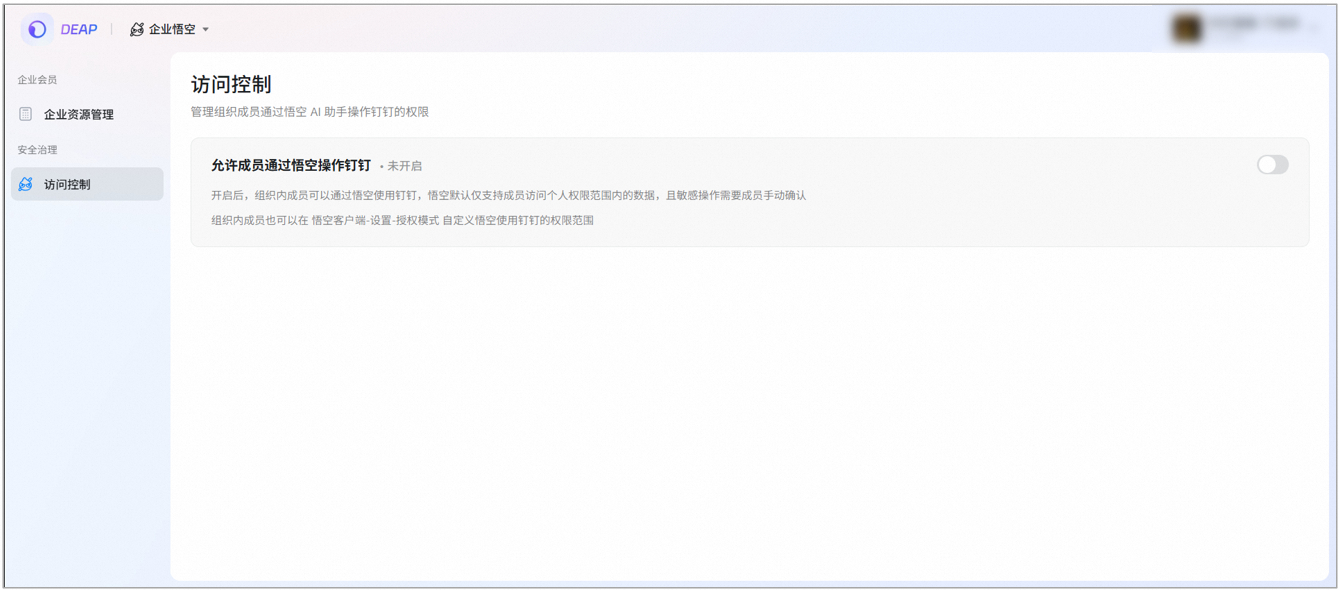
Answer: Hello, if you need Wukong to access personal data under the current organization, you need to switch the login status to the enterprise/team and enable Wukong data permissions. After clicking to apply for permissions, you need to select the main administrator corresponding to the company. The selected main administrator will receive a notification in the [DingTalk Management Assistant]. After the main administrator allows access, you can access the DingTalk data under the organization through Wukong.
The operation path is as follows:
[Wukong] - [Avatar] in the lower left corner - [Settings] - [Authorization mode] - [Apply for permissions] - [Apply permissions to the administrator] - [Select the corresponding main administrator] - Click [Submit application]. After the main administrator receives the notification from DingTalk Management Assistant, click [Go to Wukong Enterprise Management] Turn on [Allow members to operate Ding through Wukong]. Once turned on, it will take effect immediately. All members of the organization can perform Ding operations through Wukong. Sensitive operations require re-confirmation by employees, and Wukong will not perform them independently.