Competitive Comparison
There are already many smart office assistants on the market. But Wukong, built natively by DingTalk as an enterprise AI agent platform, is the one that truly combines full local control, a secure cloud sandbox, and deep DingTalk collaboration into one seamless experience.
Below is a practical comparison of Wukong against mainstream alternatives across four dimensions: pricing, core capabilities, ecosystem integration, and security/compliance.
1. Better Value for Money
High free limits and approachable membership pricing.
| Item | Wukong (DingTalk) | Other products |
|---|---|---|
| Daily free usage | 100 compute credits per day (about RMB 2.5 in value) | Often only a 7-day trial or no free tier |
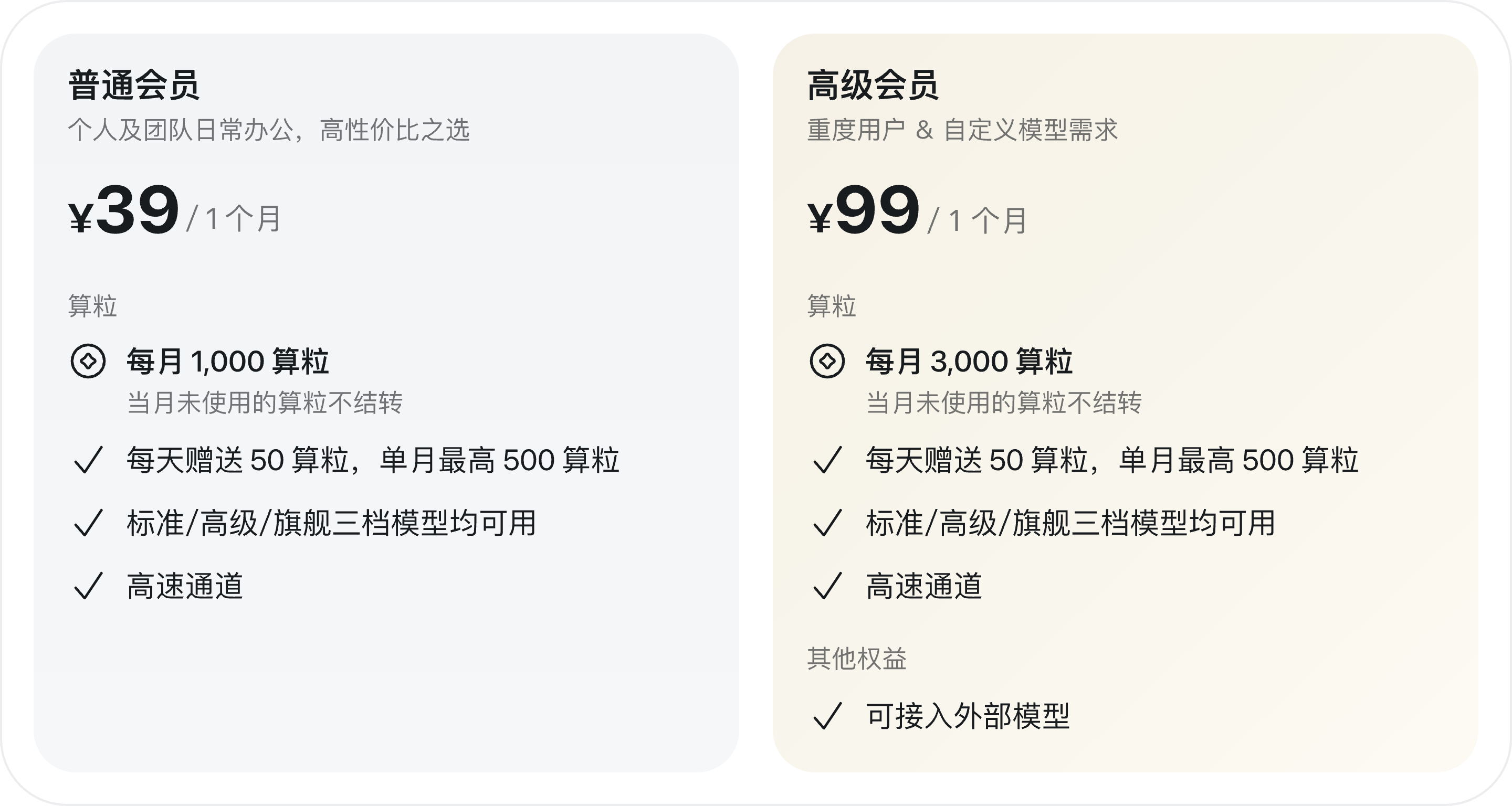
| Entry membership | RMB 39/month (Standard) | Commonly RMB 49-99/month |
| Advanced membership | RMB 99/month (Advanced) | Often RMB 199+/month |
| Top-up unit price | RMB 0.05 per compute credit | Usually RMB 0.04-0.10 per credit |
| Promotions | 15% off annual plans + 50 daily bonus credits | Usually limited-time discounts or token-based pricing |
Why Wukong stands out:
- The free tier already covers lightweight daily automation
- Membership tiers are transparent and consistent, without hidden charges
- Compute-credit pricing maps more directly to real task cost and avoids token waste
2. Broader Capabilities
Supports local control, multimodal input, and agent automation.
| Capability | Wukong | Other products |
|---|---|---|
| Local software control | Supports Excel, browsers, IDEs, and more | Often limited to web pages or API calls |
| Multimodal processing | Supports text, images, voice, and file parsing | Partial support; some only support text and images |
| Agent automation | Visual workflow orchestration with conditional branching | Often limited to simple prompts or preset templates |
| Office ecosystem integration | Deep coverage of DingTalk IM, calendar, approvals, and meetings | Some support Feishu or WeCom, but few have native DingTalk integration |
Why Wukong stands out:
- It can directly operate local desktop applications
- It is deeply embedded into DingTalk to complete the loop from task to notification to collaboration
- It provides a visual agent workflow engine, so non-technical users can build complex automation
3. Security and Trust
Backed by DingTalk’s 20+ authoritative certifications.
| Security area | Wukong | Other products |
|---|---|---|
| Data processing location | Local-first, with optional cloud sandbox | Many require upload to the cloud |
| Privacy protection | User-controlled data handling with encrypted transmission | Often not clearly documented |
| Compliance | DingTalk’s 20+ domestic and international certifications | Some have ISO/SOC, but fewer industry-specific certifications |
| Enterprise data isolation | Dedicated network and layered permissions | Often shared environments without isolated tenants |
Why Wukong stands out:
- Financial-grade data security standards for AI office work
- Dual local-plus-cloud-sandbox modes for both performance and security
- Multiple authoritative certifications including MLPS Level 3, GDPR, and SOC 2
4. Open Ecosystem
Rich extensions, flexible APIs, and cross-device coverage.
| Ecosystem area | Wukong | Other products |
|---|---|---|
| Plugin marketplace | DingTalk app marketplace plus custom plugins | Only some support third-party plugins |
| API openness | Webhook, stream, and RESTful APIs | Some limit call frequency or require premium tiers |
| Cross-device access | Phone, tablet, PC, and Cloud PC coverage | Many support only web or a specific client |
| Developer experience | SDKs, documentation, and sample code | Documentation is often incomplete or lacks Chinese support |
Why Wukong stands out:
- It can reuse thousands of enterprise apps through the DingTalk open platform
- It supports real-time mobile monitoring and intervention for tasks
- It provides a complete developer toolchain for extension and customization
5. FAQ
Q: What benefits do existing DingTalk customers get?
A: All users, including unpaid users, currently receive 100 compute credits per day. Credits reset the next day, with a monthly cap of 500 free credits. Once those are used up, you need a Wukong membership to continue using the service.
Purchase path: Wukong → usage indicator in the bottom-left → Upgrade Plan
Q: How can I check detailed compute-credit usage?
A: You can view detailed compute-credit consumption here:
Wukong → avatar in the bottom-left → Usage → Consumption Details

Q: How are Wukong compute credits consumed?
A: Compute-credit usage depends on task complexity and the model you use. More complex tasks and higher-end models consume more credits.
Q: If I use my own model, will compute credits still be consumed?
A: Only Advanced members can connect custom models. If you are not an Advanced member, Wukong will continue using the default built-in models, and compute credits will still be consumed.